


Pinterest has transformed from a simple inspiration board into a powerful platform where creators and businesses can generate real income. With over 537 million active users searching for products and ideas each month, Pinterest offers unique opportunities to turn your visual content into profit.
You can make money on Pinterest through affiliate marketing, sponsored content, product sales, blog traffic, and Pinterest ads – even without a massive following. Unlike other social media platforms, where you need thousands of followers to see results, Pinterest rewards strategic content creation and smart keyword optimization over follower count.
Whether you’re a beginner looking to earn extra income or a business owner wanting to expand your revenue streams, Pinterest’s visual search engine connects you with users who are actively planning purchases and seeking solutions. Understanding the platform’s basics and implementing proven monetization strategies will help you effectively tap into Pinterest’s earning potential.
What is Pinterest?
Pinterest is a visual search engine and social media platform where you discover and save ideas through images and videos. These visual posts, called “pins,” work like digital bookmarks.
Unlike other social media platforms, Pinterest users come with an intention. They actively search for products, services, and ideas to improve their lives. You won’t find mindless scrolling here.
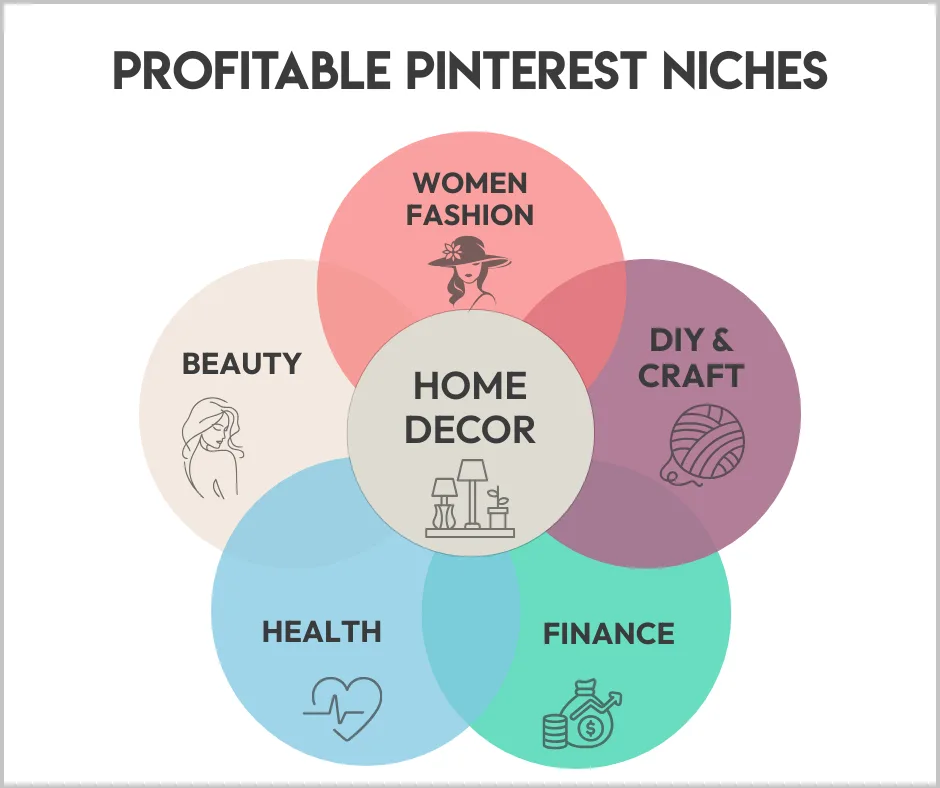
The platform serves 537 million active users each month who look for inspiration in these areas:
You can organize your pins into themed boards. Think of boards like digital folders where you collect related ideas. For example, you might have separate boards for “Kitchen Ideas” and “Summer Outfits.”
Pinterest functions as both a search engine and a discovery tool. Users type keywords into the search bar to find specific content. This makes Pinterest different from Instagram or Facebook, where content appears in chronological feeds.
The platform lets you drive traffic to your website or blog via clickable pins. When someone clicks your pin, they visit your website.
Pinterest also offers business accounts with special features. These include analytics tools, advertising options, and rich pins that pull information directly from your website.
The key advantage of making money on Pinterest is its shopping-focused audience. Users often plan purchases and research products before making a purchase.
How to Make Money on Pinterest
Pinterest offers several proven ways to generate income through its visual search platform. You can earn money through affiliate commissions, blog monetization, digital product sales, sponsored partnerships, and print-on-demand businesses.
1. Affiliate Marketing
Affiliate marketing lets you earn commissions by promoting other companies’ products on Pinterest. You create pins with special tracking links that pay you when people buy through your recommendations.
Getting Started with Pinterest Affiliate Marketing
Join affiliate programs that match your interests and audience. Amazon Associates, ShareASale, and Commission Junction offer thousands of products to promote.
Create eye-catching pins that showcase the products naturally. Write helpful descriptions that explain why people need these items. Include your affiliate link in the pin’s destination URL.
Best Practices for Affiliate Success
Focus on products you actually use or recommend. Your audience will trust authentic recommendations more than obvious sales pitches.
Use seasonal trends to boost your affiliate earnings. Pinterest users plan ahead for holidays and events, so create gift guides and seasonal content early.
Track which affiliate pins perform best. Remove low-performing content and create more pins similar to your winners.
2. Drive Traffic to Blog
Pinterest drives more website traffic than most social media platforms. You can monetize this traffic through ads, affiliate links, and product sales on your blog.
Creating Pinterest-Ready Blog Content
Write blog posts that solve specific problems your audience faces. How-to guides, tutorials, and list posts perform exceptionally well on Pinterest.
Design vertical images for each blog post. Use bright colors and clear text overlays that explain the post’s main benefit.
Optimizing Pins for Blog Traffic
Write keyword-rich pin descriptions that match what people search for. Pinterest works like a search engine, so SEO matters for visibility.
Create multiple pin designs for each blog post. Test different images and descriptions to determine which drives the most clicks.
Pin consistently to keep your content visible. Schedule pins throughout the week rather than posting everything at once.
Monetizing Blog Traffic from Pinterest
Add display ads to your blog through Google AdSense or Mediavine. More Pinterest traffic means higher ad revenue.
Include affiliate links within your blog posts. Readers who come from Pinterest are often ready to buy recommended products.
3. Selling Digital Products
Digital products generate passive income once created. Pinterest helps you reach customers searching for solutions you can deliver digitally.
Popular Digital Products on Pinterest
Printables like planners, worksheets, and wall art sell well to Pinterest users. These customers actively search for organizational and decorative items.
Online courses and ebooks work great for educational content. Create step-by-step guides that teach valuable skills.
Marketing Digital Products Effectively
Show your digital products in use through lifestyle images. People need to visualize how your planner or worksheet fits their daily routine.
Create pins that highlight specific benefits. Instead of showing the entire product, focus on individual features that solve problems.
Use Pinterest’s shopping features to tag your products directly in pins. This makes purchasing easier for interested customers.
4. Create Sponsored Content
Brands pay creators to feature their products in Pinterest content. You can create sponsored posts with direct links to brand websites and earn flat fees for this exposure.
Building a Sponsor-Worthy Profile
Grow your Pinterest following by consistently pinning high-quality content in specific niches. Brands want to work with accounts that reach their target customers.
Track your Pinterest analytics to show potential sponsors your reach and engagement rates. Document your monthly views and click-through rates.
Finding Sponsorship Opportunities
Reach out to brands that align with your Pinterest content. Small and medium businesses often have more flexible sponsorship budgets than major corporations.
Join influencer marketing platforms that connect Pinterest creators with brands. These platforms handle contracts and payments automatically.
Creating Effective Sponsored Content
Use Pinterest’s paid partnership tool to properly label sponsored pins. This maintains transparency with your audience and follows platform guidelines.
Make sponsored content valuable to your audience first. The best sponsored pins provide genuine value while featuring the brand naturally.
5. Open Print on Demand Store
Print-on-demand lets you sell custom products without inventory or upfront costs. You create designs, and companies print and ship items when customers order.
Choosing Print on Demand Products
T-shirts, mugs, and phone cases work well for Pinterest audiences. These items photograph beautifully and appeal to gift buyers.
Home decor items like canvas prints and throw pillows perform exceptionally well. Pinterest users actively search for unique decorative pieces.
Creating Marketable Designs
Research trending keywords on Pinterest before creating designs. Look for popular quotes, themes, and visual styles in your niche.
Design products that solve specific problems or express particular interests. Niche designs often outperform generic options.
Marketing Your Print on Demand Products
Create lifestyle photos showing your products in real settings. Stage your mugs in cozy kitchen scenes or display wall art in decorated rooms.
Pin regularly to multiple relevant boards. Each design should appear across several boards that reach different segments of your audience.
Use seasonal events to boost sales. Create holiday-themed designs and pin them weeks before each celebration begins.
Tips for Making Money on Pinterest
Success on Pinterest requires strategic planning and consistent execution across multiple areas. Setting up the right foundation with proper account configuration, optimized content, and regular posting creates the best opportunities to earn income.
1. Set up a business account
Converting to a Pinterest business account unlocks essential tools for making money on Pinterest. Business accounts provide access to Pinterest Analytics, advertising options, and Rich Pins features that personal accounts cannot use.
The conversion process takes less than five minutes. Navigate to your settings and select “Convert to business account.” You’ll need to verify your website and provide basic business information.
Key business account benefits:
Business accounts also display a “Shop” tab on your profile. This feature lets visitors browse your products directly from Pinterest. The professional appearance builds trust with potential customers.
2. Optimize your profile
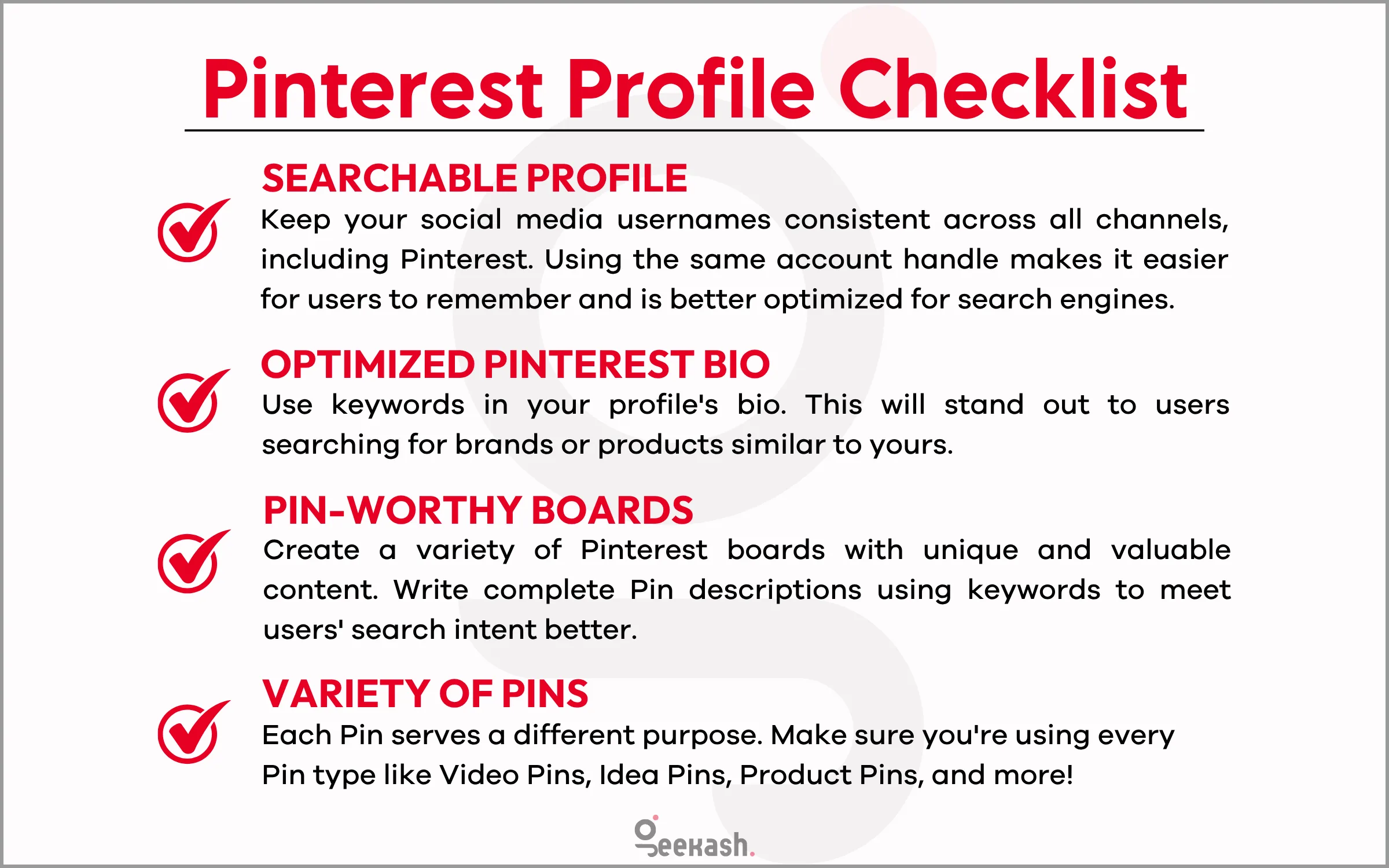
Your Pinterest profile serves as your business storefront and directly impacts your ability to earn money. A well-optimized profile attracts more followers and increases pin visibility in search results.
Use a clear profile photo that represents your brand or business. Write a keyword-rich bio that explains what visitors will find on your boards. Include your website URL to drive traffic to your monetized content.
Profile optimization checklist:
Create board titles using keywords your target audience searches for. Instead of “Recipes I Love,” use “Easy Healthy Dinner Recipes.” This approach improves discoverability and attracts engaged users.
Board descriptions should explain the content while incorporating search terms. Pin high-quality images to each board before making them public.
3. Create rich pins
Rich Pins automatically sync information from your website to your Pinterest pins. This feature provides extra context, increasing engagement and click-through rates for your monetized content.
There are three types of Rich Pins: Product Pins, Recipe Pins, and Article Pins. Product Pins show current pricing and availability. Recipe Pins display ingredients and cooking times. Article Pins include headlines and author information.
Setting up Rich Pins requires adding meta tags to your website code. Most website platforms like WordPress offer plugins that handle this automatically. After adding the tags, use Pinterest’s Rich Pin Validator to confirm proper setup.
Rich Pin advantages:
Rich Pins are particularly beneficial for e-commerce businesses and bloggers. The additional information helps users make purchasing decisions and drives qualified traffic to your site.
4. Focus on SEO
Pinterest functions as a search engine, making SEO crucial for earning money on the platform. Users search for specific topics, products, and solutions using keywords. Optimizing your content for these searches increases visibility and traffic.
Research keywords using Pinterest’s search bar. Type your main topic and note the suggested completions. These suggestions represent popular search terms your audience uses.
Pinterest SEO best practices:
Pin descriptions should read naturally while incorporating keywords. Write 100-200 characters that explain the pin’s value and encourage clicks. Avoid keyword stuffing, which reduces engagement.
Board organization affects SEO performance. Create specific boards for different topics rather than broad categories. “Budget Meal Prep Ideas” performs better than “Food Stuff.”
Fresh content ranks higher in Pinterest search results. Regular pinning signals active engagement to the algorithm.
5. Post Pins consistently
Consistent pinning maintains your presence in Pinterest feeds and search results. Regular activity signals to Pinterest’s algorithm that your account provides value to users.
Aim for 5-10 new pins daily across your boards. Mix fresh content with repins of your existing pins to different relevant boards. This approach maximizes reach without overwhelming your audience.
Effective pinning schedule:
Use scheduling tools like Tailwind or Later to maintain consistency without spending hours daily on Pinterest. These tools identify optimal posting times based on your audience’s activity patterns.
Batch content creation saves time and ensures consistent quality. Spend 1 day per week creating multiple pins for upcoming posts or products.
Avoid posting identical content too frequently. Pinterest may reduce visibility for repetitive content. Wait at least 3-4 months before reposting the same pin to the same board.
6. Add a save button to your website
Pinterest Save buttons on your website make it easy for visitors to share your content. This feature increases your content’s reach and brings new visitors to your Pinterest profile.
Install the Pinterest Save button on blog posts, product pages, and other valuable content. When visitors save your content, their followers see it in their feeds, expanding your reach organically.
Save button implementation:
WordPress users can install the Pinterest Save Button plugin to automatically implement it. Other platforms may require manual code installation.
The Save button also provides valuable data about which content resonates with your audience. Use this information to create more pins around popular topics.
Hover-over Save buttons work particularly well for image-heavy content. These buttons appear when users hover over images, making saving effortless.
7. Track your analytics
Pinterest Analytics reveals which pins drive the most traffic and engagement to your monetized content. Understanding these metrics helps you focus on strategies that generate income.
Monitor impressions, saves, clicks, and pin clicks for each piece of content. High impressions with low clicks indicate your pin titles or images need improvement.
Key metrics to monitor:
Review analytics monthly to identify trends and successful content types. Create more pins similar to your top performers.
Track which boards generate the most website traffic. Focus your efforts on topics that convert browsers into visitors and customers.
8. Try different pin formats
Don’t put all your Pins in one basket. Experiment with different formats such as static images, videos, Idea Pins, and carousels to see what resonates with your audience.
Videos are particularly effective for tutorials or product recommendations, while Idea Pins excel in storytelling. Testing various formats allows you to discover innovative ways to engage and convert potential customers.
9. Stay authentic and helpful
Pinterest users come to the platform for inspiration, not advertisements. Create Pins that solve problems, teach something new, or spark creativity. When your content is genuinely helpful, it builds trust and leads to more clicks, saves, and ultimately, sales.
Focusing on genuine connections is more effective than being overly promotional—prioritize connection first and promotion second.
In Summary
I always advise my viewers to start simple and scale slowly. You don’t need to be a designer, influencer, or marketing expert to make money on Pinterest.
Begin with one niche, create helpful content, and remain consistent.
Focus on building your pinning habit, improving your designs, and learning what works. Don’t wait for things to be “perfect“—progress is more important than perfection.
The great thing about Pinterest is that pins last longer than social media posts and can continue to drive traffic—and income—for months or even years.
Whether you’re promoting affiliate links, selling digital products, or growing a blog, Pinterest rewards patience and high-quality content.
So choose a niche, start pinning, and watch your efforts accumulate over time.